Doors.NET uses a license key, which is most easily activated over the Internet, (following installation of the software). You can however, run the software in demo mode for 30 days, in which case you will not need a license key (and an Internet connection is also not required for demo mode). Or, you can send in the license key via e-mail and Keri Systems will activate the license for you. Note: a standard Doors.NET license only includes support for standard NXT controllers. When using PXL or NXT Mercury-Powered controllers you will need to contact inside sales to have these controller types enabled. Ensure you have your license key at hand when you call.
Custom Credential Formats, Area Control, Host Schedules, System Calendar, Rollcall Client, Map Client, Photo ID, LDAP client and a Professional Report Client. The license key can be altered to allow for additional client connections, additional gateways or for increasing the capacity for supported readers or cameras - Many of these additional features are covered in detail elsewhere within the Online Help. Note: Not all hardware types supports all the available features, please consult Keri Technical Documentation if you are unsure of compatibility.
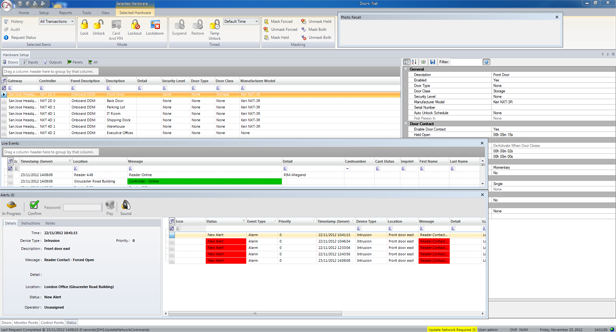
Alerts can be easily setup in Doors.NET to automatically give an indication in the software when a certain event type occurs. For example, if a panic button is pressed, if a secure door is forced open, if an Anti-Passback violation occurs, if an NXT reader or a controller goes offline, if a tamper switch goes active, or if a motion detection sensor is activated.
An alert can be generated from virtually any hardware object defined in the system; (a reader, controller, input (monitor point), output (control point) or NXT 4x4 module). A sound alert can also be attributed to a wide variety of system events, so that a sound file will automatically play when the event happens, and it can be set to repeat until the event has been confirmed. This is ideal for a system that is not being continually monitored, (as there will not always be someone looking at the software screen). The sound file can be any .WAV format file or you can use any of the sound files included in the software, by default. In addition, if the system is not always monitored, it is easy to setup event notification to occur via e-mail or SMS. A notification will appear in the recipient's inbox or on their mobile phone when the event happens, along with additional information such as the event type, the door location and time/date stamp.
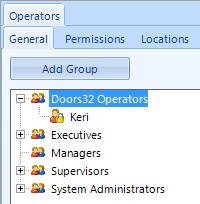
Doors.Net supports an unlimited number of software users and user groups. User rights can be configured with limitations or they can have the same user rights as a system administrator. Anyone with administrator rights can add users, configure rights and assign those rights to other users. User rights can be used to restrict which software permissions and features are available, which cardholders and access rights can be seen and edited and which transaction events will be seen from the system hardware.
The MSC and Mercury MSC hardware support the ability between two doors which are connected to the same controller. The principle of an airlock is that only one of the two doors can be opened at any one time. When one of the doors is open the opposite door will not grant access. This feature uses the 'Area Control' license option.
Area Control is supported on MSC and Mercury MSC hardware. It allows you to define areas for your system. These areas can be defined with occupancy counts, which when combined with the Local Linkage option can enable you to setup various functions; such as automatically switching off lights or controlling how many people can enter a certain area of a building or a car park for example.
Customize the application to automate and action almost any task that the system can perform from almost event event that the system can generate (only available with NXT Mercury Powered (MSC) or Mercury (MSC) hardware.
Enables the Situation Manager toolbar and configuration settings. Situation Manager allows you to define different threat levels for your facility. It automatically changes the mode of designated readers at the press of a button.
The Doors.NET™ system supports Keri NXT, Keri MS and Wiegand formats. The Credential Types editor allows you to define the bit pattern for custom card formats.
Extensive Elevator Control featured available when using NXT MSC or Mercury MSC hardware types. NXT 4x4 modules and NXT GIOX modules can be used for various sized elevator applications.
Keri Systems offers a new Video Plug-and-Play option that replaces the previous Reflections™ video program. The feature allows you to add a multitude of camera models from several manufacturers. Once cameras are added to Doors.NET you can associate a camera with readers, inputs or outputs and trigger a live video stream from events that are generated from the linked hardware
provides a way to automate system functions and notifications. System events are used as triggers to action defined Global Linkage macros. See the Global Linkage Overview for additional information about what you can do with this feature.
(LDAP) Lightweight Directory Access Protocol
provides integration between Doors.NET software and a Microsoft Active Directory. It creates Doors.NET cardholders by importing Active Directory users, plus it synchronizes changes, either from Active Directory to Doors.NET or from Doors.NET to Active Directory.
Multiple Administrative Clients
Allows for the connection of multiple clients - allowing multiple system operators to administer the system simultaneously.
The system supports multiple gateways, including co-habiting gateways (of different hardware types) - Note: Only one gateway of each hardware type can be installed per PC.
Photo identification credentialing system. Includes a template designer, photo capture tool, signature capturing, bar coding, water-marks, custom logos, backgrounds and fonts. Formats can be automatically assigned to card holders based on user-specified criteria. Photo ID is compatible with a wide range of capture devices and printers on the market today.
A report designer that allows you to create professional looking reports from scratch or to modify any of the default reports. The designer is easy to use with the drag and dropinterface, the property toolbox, and the standard text edit commands. You can add your own custom logo and change the header and footer text. Reports can be saved for later use or exported.
The Roll Call client has been developed to provide you with a graphical representation of occupancy within defined areas of a facility, including last known location of a cardholder. Roll Call areas can be setup to include all the system readers, or just readers within a defined area. Rollcall Advanced gives you real-time muster report with occupancy count and automatic printing of the occupancy list (i.e who is still in the building).
Allows you to automate system tasks, such as performing a full system backup at the end of the day. Or periodically synchronizing the time and date stamps of all the controllers on the network which is very important if Global linkage actions are defined for the system.
Time and Attendance Sync Service
Provides a generic interface directly to a SQL or Oracle time and attendance database. This database is then interrogated by a third-party Time and Attendance software package to produce Time and Attendance reports.